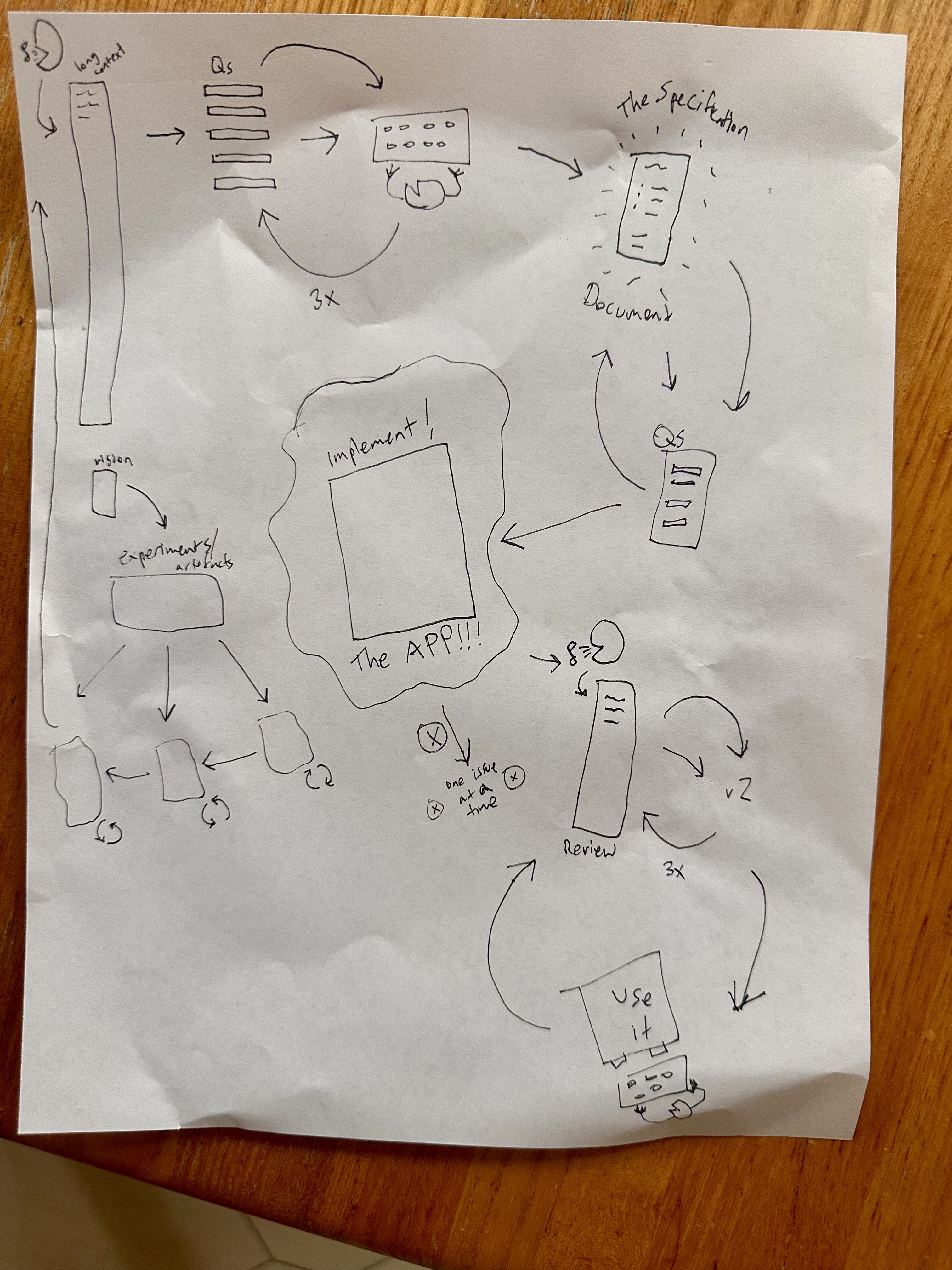
This app was built using the exact methodology it teaches. Here's how I went from idea to implementation using the Web App Factory process.
I started with a hand-drawn sketch of what I wanted the app to look like and feel like. The vision was simple: create a tool that guides people through building web apps with LLMs, using a methodical step-by-step process.
Key vision points: Simple, blue monospace aesthetic. Big numbered steps. Forms that generate prompts. No rounded corners, blocky and old-school. Everything should feel deliberate and methodical.
I recorded myself talking through the entire application for about 15 minutes, describing every detail I could think of. This brain dump included all the steps, the visual design, how forms should work, what gets generated, and the overall philosophy.
Recording tips: Don't worry about being organized. Just talk! Cover everything: UI details, user flow, technical requirements, feelings, examples. The LLM will organize it later.
The LLM generated clarifying questions about technical implementation details. These questions helped me make decisions about framework choice (vanilla JS), state management (localStorage), styling approach (Tailwind), and other technical details.
Key decisions made: Vanilla JS (no framework), Tailwind CSS, localStorage for state, clipboard.js for copying, Blob API for downloads, mobile-first responsive design.
Based on my answers, the LLM generated more detailed questions about UI behavior and specific implementation choices. This round clarified exact colors (#3E43EF), button behaviors, error handling, and file naming conventions.
Fine details clarified: Step number display (large squares), blue color (#3E43EF), shadow style (4px non-blurred), button feedback ("Copy" → "Copied!"), file naming (vision.txt, specification.md, etc.).
I used an LLM to transform my rambling transcription into a well-structured specification document. The LLM organized everything into clear sections: technical requirements, design specs, step-by-step details, and implementation notes.
The transformation: 15 minutes of rambling → organized specification with 9 detailed steps, technical architecture, design requirements, and implementation patterns.
Before implementing, I had the LLM create a style test page to verify all the visual design decisions. Through several iterations, we refined the exact look: blue borders, shadows, placeholder colors, form styling, and button states.
Iterations needed: Started with style-test.html, refined through voice feedback to style-test-v2.html, finally landed on final-style-guide.html as the canonical reference.
With a clear specification, answered questions, and finalized style guide, the LLM generated the complete single-file HTML application you're using now. One prompt with "ultrathink" mode produced the entire functional app.
The magic moment: "Using final-style-guide.html as the definitive canonical style guide and web-app-factory-specification.md as the specification, do a full implementation of index.html all in one file. ultrathink."
🎉 The process works!
This app was built using the exact methodology it teaches. From vision to voice transcription, from specification to clarifying questions, from style guide to implementation - every step of the Web App Factory process was used to create the Web App Factory itself.
Voice transcription is powerful
Speaking freely for 15 minutes captured more detail than hours of writing would have.
Questions remove ambiguity
The clarifying questions process caught dozens of decisions I hadn't considered.
Style guides prevent iteration
Getting the visual design right in a test file saved countless implementation cycles.
Single files work great
For projects that fit in context, a single HTML file is simple, portable, and effective.
The process is the product
By following the Web App Factory process to build itself, the app validates its own methodology.
Now that you've seen how this app was made, use the same process to build your own web app: